




✨ Introduction #
Kaamfu uses a color-coded system to represent task statuses in the Productivity Panel. Understanding these indicators is crucial for quickly interpreting productivity and identifying workflow bottlenecks.
.
🎯 Why This Feature Matters #
Task statuses matter because they:
- Identify active, paused, and completed tasks
- Monitor break and idle times
- Detect issues like late returns or technical interruptions
By interpreting statuses correctly, managers save time and improve oversight
.
👤 Who Should Read This #
This article is useful for:
- Organization owners
- Team leads
- Employees learning to read workflow statuses
Anyone using the Productivity Panel will benefit from understanding statuses.
.
📝 What This Guide Covers #
You’ll learn:
- Color codes and their meanings
- Break times and idle states
- Active vs paused tasks
By the end, you’ll read statuses at a glance with confidence.
.
📄 Feature Overview #
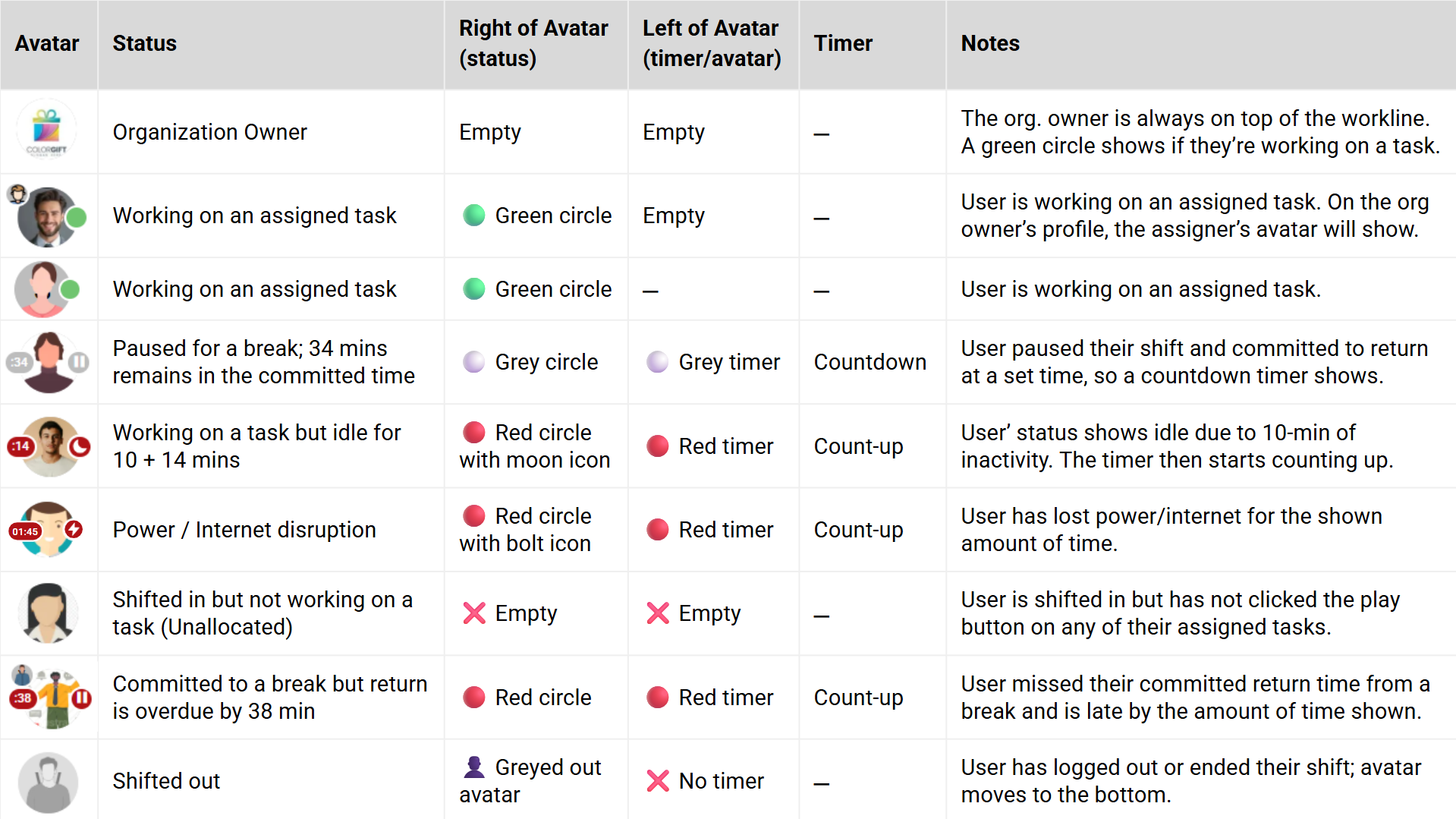
Task statuses appear alongside tasks and user profiles. They use colors and symbols to represent activity, breaks, delays, or connectivity issues. This makes the panel intuitive and easy to scan.
- Green → Active Task
- Grey → Paused Task
- Grey with Countdown → On Break
- Red with Countdown → Late from Break
- Red with Exclamation → Power/Internet Issue
- No Status → Shifted-in but Idle
- Greyed Out → Shifted Out.
Review these regularly to monitor workflow health.
.
.
💡 Key Benefits #
Understanding statuses gives:
- Quickly identify employee activity
- Prevent miscommunication regarding task progress
- Support proactive management of workflow.
This improves communication and efficiency
.
🔗 Related Resources #
Learn how color codes reflect task and break statuses.
Each explains how task statuses integrate into broader productivity tracking.