



Kaamfu.ai has been upgraded from a purely informational website into an active entry point to the product. You can now sign up or sign in directly from the website using a single, consistent flow that works across desktop and mobile.
Both actions are accessible through the same button at the top right corner: Get started for free. This button opens the signup form by default, with sign in available from the same screen.
Create your free Kaamfu account by signing up
The Kaamfu.ai website now supports full account creation, allowing new users to onboard without leaving the site.
Why This Matters
Launching signup directly on Kaamfu.ai sends a clear signal about where onboarding should begin and how quickly users can reach value.
- Faster time to entry: New users no longer need to navigate external flows or wait for manual setup. Signup starts on the website and leads directly into Kaamfu.
- Mobile friendly onboarding: Users can create an account from the mobile website, making signup possible from anywhere.
- Secure by default: Every signup uses a magic link, ensuring passwordless, secure access while keeping the flow simple.
Making signup native to the website reflects Kaamfu’s belief that onboarding should be immediate, accessible, and friction free.
How It Works
Here’s how the signup flow works across desktop and mobile.
Desktop signup flow
- Start by going to kaamfu.ai
- Click Get started for free in the top right corner
- The Sign Up form opens by default
- Complete the signup steps
- A magic link is sent to your email
- Open the email on desktop and click the button to enter your workspace
- You are taken directly into Kaamfu after signup
Mobile signup flow
- Open kaamfu.ai on your mobile device
- Tap Get started for free
- Complete the signup steps on mobile
- A magic link is sent to your email
- Open the email on a desktop computer and click the button to access your workspace
Both desktop and mobile signup send the same magic link, which should be opened on desktop to enter the workspace.
Signup Steps
The signup form itself remains intentionally simple.
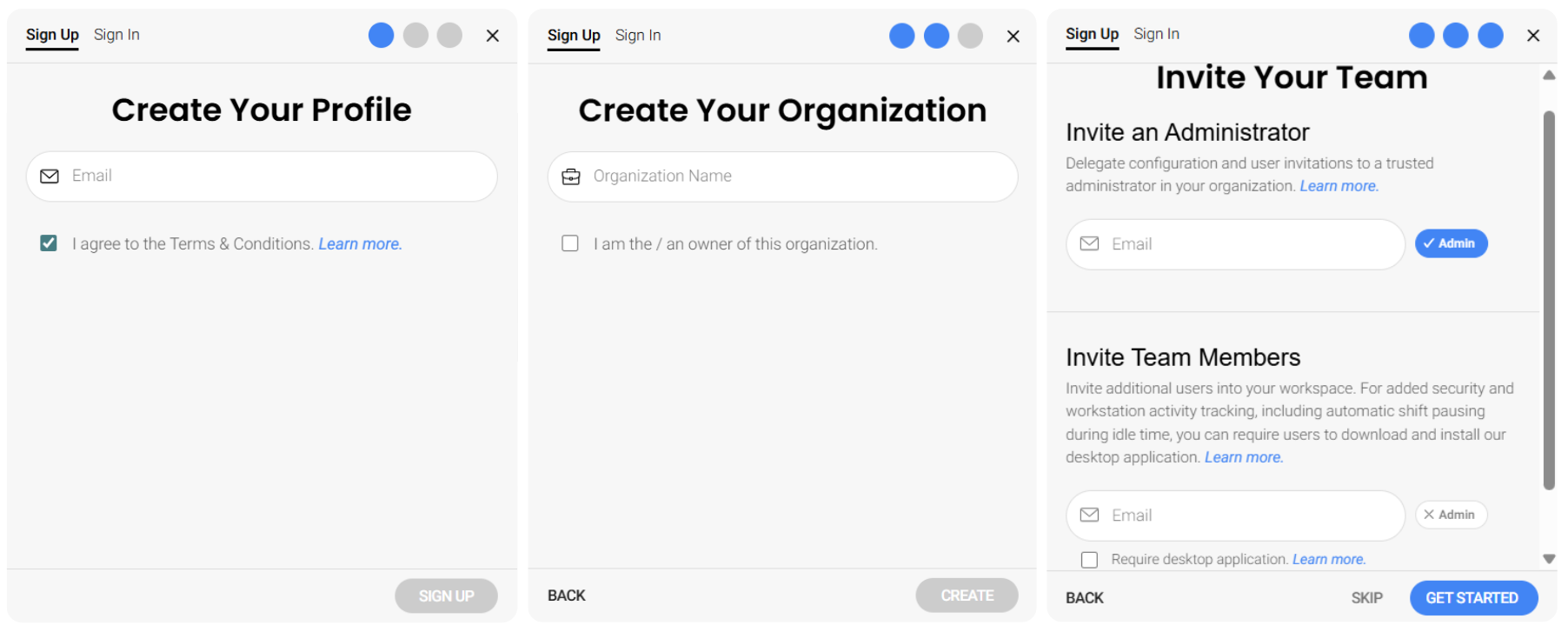
Step 1: Create Your Profile
Users enter their email address to proceed. The Terms and Conditions are pre-checked to save your time.
Step 2: Create Your Organization
Users enter their organization name and confirm ownership, creating their workspace.
Step 3: Invite Your Team (optional)
Users can invite Administrators or Team Members, or skip this step to complete signup immediately.
Signing in to access your Kaamfu workspace
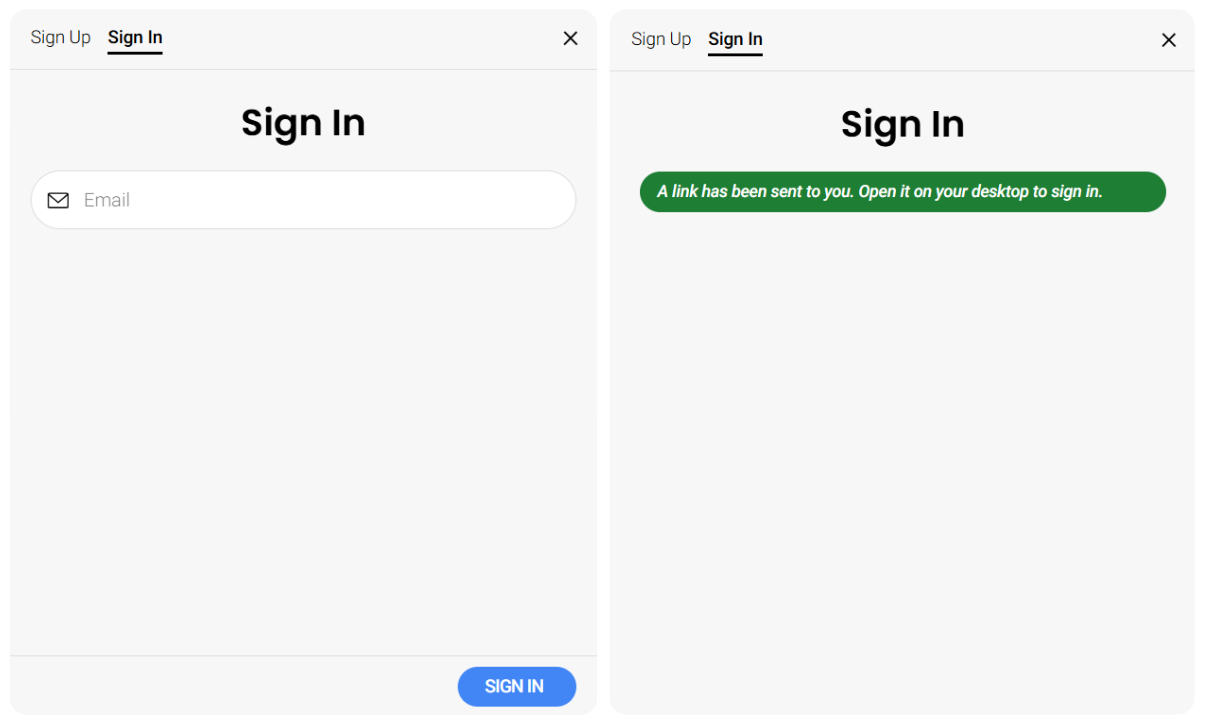
Returning users can now sign in from the same website entry point without a separate page or flow.
Why This Matters
Adding sign in to Kaamfu.ai establishes the website as the single gateway to the product.
- One consistent entry point: Users no longer need to remember different URLs or paths to access Kaamfu.
- Passwordless access: Sign in uses the same magic link approach, keeping access secure and effortless.
- Clear desktop handoff: The flow makes it explicit how users move from email to workspace without confusion.
This creates a predictable and secure experience for every returning user.
How It Works
- Go to kaamfu.ai
- Click Get started for free
- Switch to Sign In
- Enter your email address and click Sign in
- A magic link is sent to your email
- Open the email on desktop and click the button
- You are taken straight into your workspace